For iPhone · iOS 27

Keep the words that stopped you.

Save the quotes that stop you, from posts, books and chats. Paste them in, or let any AI pull them out for you. Sanctum files each one and brings it back when you need it most.

Preview a topic

Free. On your phone.
No account, no feed, no streaks.

13topics, filed on your phone
10ways to say “Remind me”
9 in 10lines filed right, no tagging
0servers that see your lines

1,000

Screenshots savedReread: none

The problem

Screenshots are not memory.

We save a thousand screenshots and reread none of them. The line that got you through a bad week sinks under receipts and memes.

Sanctum is where the ones that matter live. Paste the words in, or let any AI pull the quotes out of whatever you saved. Sanctum keeps each line exactly as written, files it, and hands it back on the days you forget who you are.

Your pace is still a pace.
Glorious Purpose · For the days you forget who you are

How it lives on your phone

You never have to open the app.

01 · Widgets

Today's line, waiting on your Home Screen.

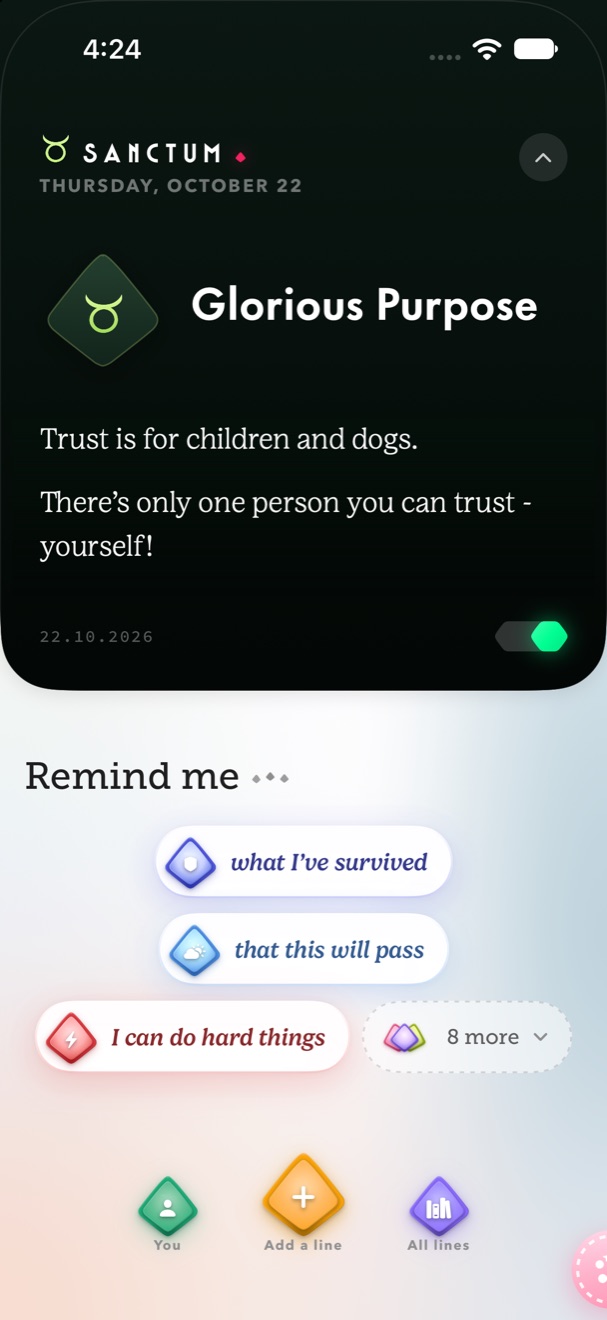
Sized to fit, never cut off. The Poster sets your line big in one of seven colours; tap a Remind me widget and a line of yours answers. Glorious Purpose, or your own two words, sits on the Lock Screen.

  • Home ScreenPoster, Today's line, Remind me, Your week, Date & hello, Gem jar
  • Lock ScreenTwo words, Poster, the ox
  • Control CenterGive me a line, Keep a line
Sanctum · Today's line
Remind meThis will pass
9:41
◆ Two wordsGlorious Purpose“Your pace is still a pace.”
02 · Ask any AI, paste, or write

Hand it the words. It does the sorting.

Copy Sanctum's prompt into ChatGPT, Claude or Gemini with whatever you saved: a messy list, your notes, a topic you need lines for. Paste the answer back and every line lands, word for word, filed under its topic. Or paste notes straight in, write a line yourself, or share one from any app. Nothing is kept until you say Keep.

  • Ask any AICopy the prompt, paste the answer
  • Paste notesSplit into lines, word for word
  • Share sheetAny app

…tell the people you love that you love them. Love said out loud carries people through hard days. Tell them tonight…

Messages
Notes
Sanctum
Mail
Filed under Relationshipsjust now
Kept 12 lines · sorting 3 into topics…Change

03 · All lines

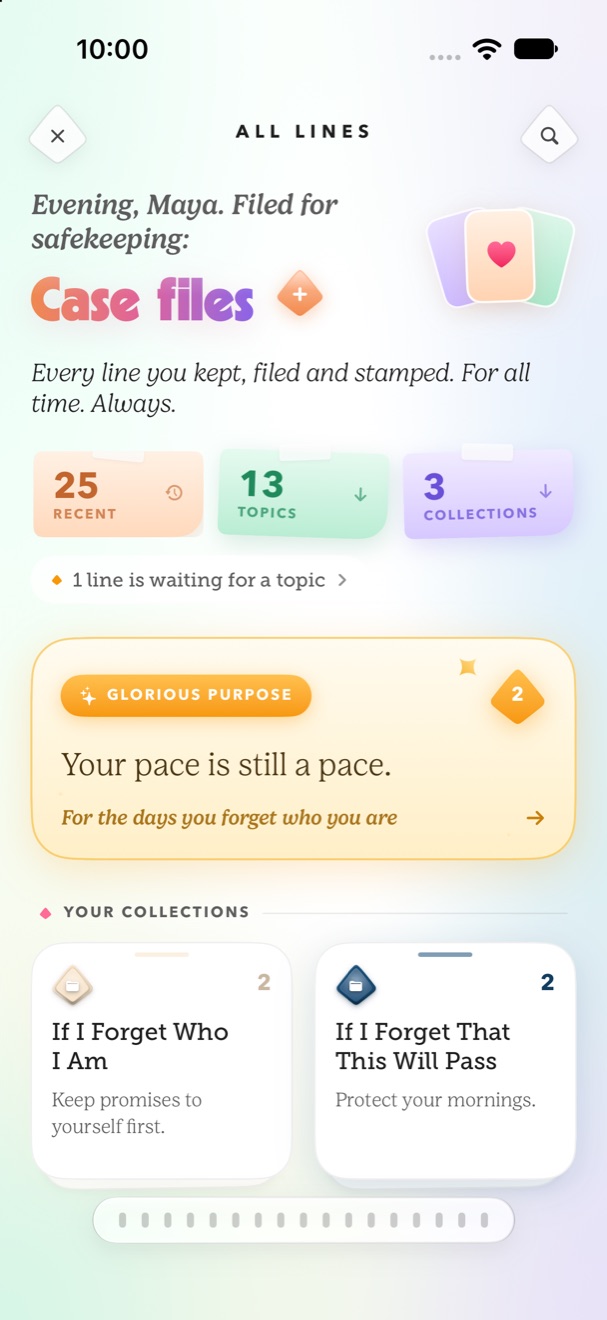
Every line you kept, filed and stamped.

Topics say what a line is about. Collections say why it matters to you, like If I Forget Who I Am, and a collection can be sent to a friend as one small file that opens straight into their Sanctum. A line that isn't clearly one thing waits quietly for you to file it, so nothing is misfiled.

  • RecentNewest first
  • Topics13, filed for you
  • CollectionsWhy it matters to you · share one as a file
  • FromMarvel, Harry Potter… sorted by series
Sanctum's All lines screen: counts of recent lines, topics and collections, a featured line and two collections

04 · Your week

How do you feel? One tap, then it lands.

Nine moods in a carousel, the words that fit each one, and a line for today from your own library. The week fills in as frosted glass, and stretches into the month. No streaks, no guilt, nothing to keep up.

  • Check inNine moods, your words
  • Your moodsThe week, then the month
  • Daily reminderOne a day, at your time

How do you feel?

Today, you're steadyjust now
Your week · 5 of 7 checked inMoods
A line for today · Your pace is still a pace.Open

Thirteen topics

Every line, filed for you.

Each line gets exactly one topic. Tap one to repaint the page in its colors.

And

How it works

Save. Sort. Return.

Ten seconds to keep a line. The rest happens on its own.

  1. Step one

    Keep a line.

    Paste it, write it, share it from any app, or copy Sanctum's prompt into any AI and paste the answer back. Nothing is reworded or trimmed.

  2. Step two

    It files itself.

    Sanctum reads the line on your phone and drops it into the right topic and collections. No folders, no tags, no work.

  3. Step three

    Ask it to remind you.

    Who you are. Why you started. What you've survived. That this will pass. Tap one and a line of yours answers.

Try it

Write a line. Watch it file.

Filed under

This demo runs in your browser and sends nothing anywhere.

Free and private

Free. All of it.

No price, no tiers, no trial, no account. Every topic, collection and widget is yours from the first line you keep.

  • Filed on your phoneLines are sorted by the on-device model on Apple Intelligence phones, and by a keyword pass everywhere else. Nothing is sent anywhere to be read.
  • No photo accessSanctum never asks for your Photos, camera, contacts or location. It only ever sees the words you hand it. Using another AI? That's your conversation with them; Sanctum only gives you the prompt.
  • No sign-upNo profile, no followers, no email. Open it and start keeping lines.
PriceAdsFeedFollowersStreaksCloud

Quiet on purpose. Your lines never leave your phone.

Questions

Before you download.

More on the support page and in the privacy policy.

Where are my lines stored?

On your iPhone. Sanctum files and sorts them on the device, and your lines never leave your phone.

Do I need an account?

No. There's no sign-up, no profile and no followers.

How do my quotes get in?

Three ways. Ask any AI: copy Sanctum's prompt, paste it into ChatGPT, Claude or Gemini with whatever you saved, and paste the answer back; every line lands word for word with its topic. Paste notes: drop in a messy list and Sanctum splits it into lines. Write it: type one yourself. You can also share a line to Sanctum from any app.

Does Sanctum read my screenshots?

No. Sanctum never asks for Photos. If your quotes are in screenshots, paste the words, or hand the text to any AI with Sanctum's prompt.

Can I share a collection with a friend?

Yes. Long-press a collection and choose Share collection. It goes as one small file by AirDrop, Messages, Mail or Files. On their iPhone it opens straight into Sanctum and lands as a collection of theirs, every line word for word. They need Sanctum installed.

What's the difference between topics and collections?

A topic is what a line is about, like Motivation or Feel Better. Every line has exactly one, and Sanctum picks it. A collection is why it matters to you, like If I Forget Who I Am. A line can sit in several.

What does Remind me do?

Pick what you need to hear, like who you are, why you started or that this will pass, and Sanctum answers with a line from your own library.

Is it really free?

Yes. There are no paid plans, no in-app purchases and no ads. Every feature is included.

Which devices does it support?

iPhone with iOS 27 or later. It also runs on iPad, but it's designed for iPhone.

Remember
who you are

Save your first line tonight. Tomorrow morning, it'll be waiting.

Download on theApp Store